Trending

Epic Games is known for adding new features to Fortnite since the game's official launch in 2017. Quality of life changes, such as proximity chat and blocking emotes, allowed players to customise their in-game preferences.
Epic Games has once again added a new in-game quality of life feature in Chapter 5 Season 4 that allows players to enable sleep mode. Sleep mode is a unique feature that puts the game to sleep once the player remains away from the game for a set time.
If you're looking to disable sleep mode in Fornite, here's how you can do it in-game.

How to disable Sleep Mode in Fortnite
The sleep mode in Fortnite is enabled by default with a timer of 15 minutes. So, if you remain away from the game for 15 minutes, your game will go into sleep mode.
While Epic Games has added the sleep mode as a power-saving or quality-of-life feature, the main reason behind this new feature is to stop players from farming XP by going AFK in Creative or LEGO Fortnite.
Once the game detects inactivity for a certain amount of time, sleep mode kicks in, disabling matchmaking and voice chat. Moreover, it might also end up disconnecting you from Creative or LEGO Fortnite sessions. Here's how you can disable the feature in Fortnite:
- Launch Fortnite
- Head to Settings
- Navigate to the Game tab
- Scroll down to the Sleep Mode and Energy Saving section
- Then set the Activate Sleep Mode Timer to Never to disable Sleep Mode in Fortnite
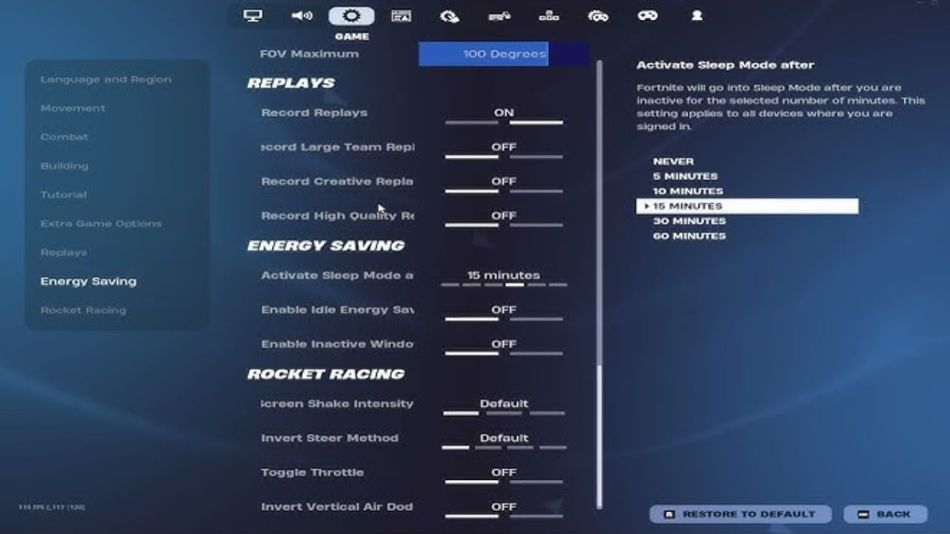
Once you disable Sleep Mode, you can toggle it On again if you feel like it. However, if you're reliant on using Creative and LEGO Fortnite for completing your battle pass, then we recommend disabling the feature until further notice.

DON'T MISS: